ChatGPT Voice Can Now Direct Work & Codex on Your Desktop
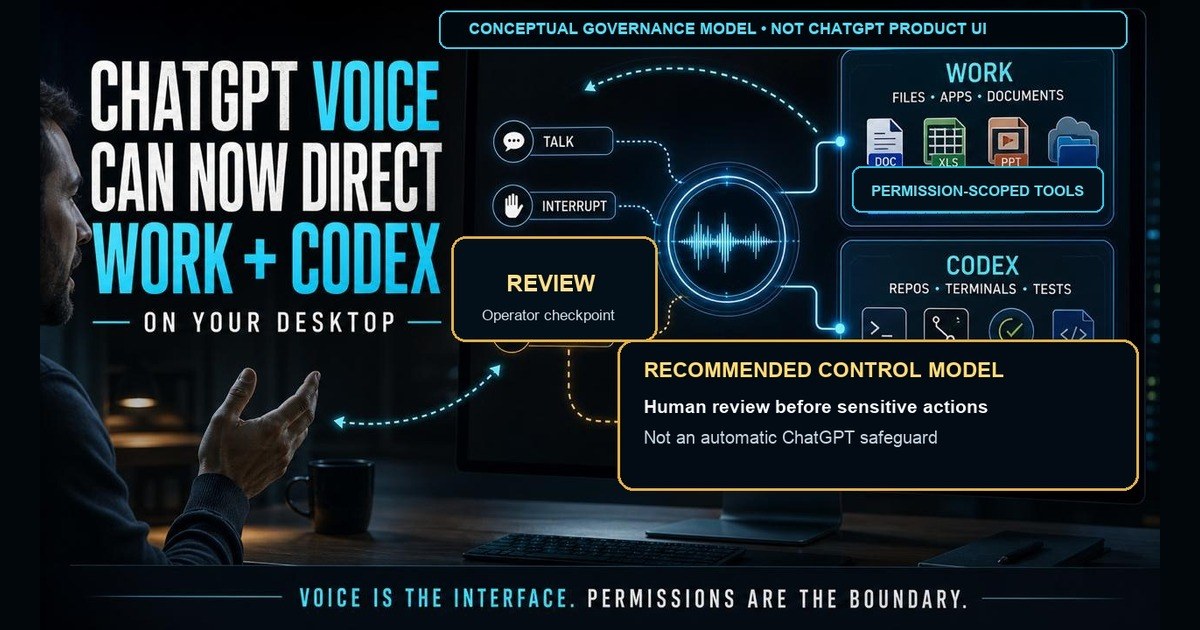
The important change is not voice dictation. It is maintaining a live conversation while Work or Codex operates on files, applications, repositories, terminals, and other tools.
Traditional voice assistants were designed mainly for short requests. OpenAI moved closer to a persistent supervisory model on July 23, when it added Voice to Work and Codex on desktop.
You can now speak naturally, interrupt, redirect the work, ask for progress, and coordinate agents using the tools and permissions available in the selected mode.
The phrase “available tools and permissions” is doing a lot of work. This is not unlimited voice control over every computer. It is a conversational control layer over whatever Work or Codex has been authorized to use.
You no longer have to stop the work, compose another detailed prompt, and wait for a new turn. The conversation can remain open while the agent keeps working.
Why This Matters
OpenAI's July 23 release notes describe the update simply: Voice is now available in Work and Codex on desktop.
According to OpenAI’s Voice documentation, users can:
- start, prioritize, interrupt, or redirect tasks while work continues
- coordinate multiple agents across active projects and conversations
- resume work using project context and supported connected tools
- receive spoken or on-screen progress updates
- control the computer through the tools and permissions available in Work or Codex
Work can research, analyze information, use approved local files and desktop applications, and create finished documents, spreadsheets, presentations, reports, and Sites. Codex can work with local folders, repositories, terminals, tests, diffs, and developer tools.
Voice now sits on top of that authority.
This is not just dictation
Dictation converts speech into a prompt. You talk, review the transcription, and send it.
Voice in Work or Codex stays in the loop while the task unfolds.
You can say:
“Review the transcripts in this project. Identify the customer use cases, stakeholders, commitments, technical requirements, risks, and next actions. Update the opportunity brief. Stop before sending or publishing anything.”
Then, while Work is processing the folder, add:
“Treat the workshop notes as more current than the original proposal. Flag any conflict instead of choosing silently.”
The second instruction changes active work. You do not need to wait for the first task to finish or restate the entire context.
OpenAI built GPT-Live around full-duplex interaction. It can listen and speak at the same time, respond to interruptions, and delegate deeper search or reasoning to another model while keeping the conversation open. At launch, OpenAI says GPT-Live delegates deeper work to GPT-5.5.
That makes Voice less like a microphone button and more like a live supervisor channel.
Five useful professional workflows
1. Direct a project using approved local files
Instead of constructing a perfect prompt, describe the outcome, source material, constraints, and approval boundary.
“Open the customer project. Review the transcripts and planning documents. Create a meeting brief, prioritize the use cases, and build a client-ready presentation. Ask me before making any decision that would materially change the recommendation.”
Desktop Work can use approved local files with permission. That could support transcript review, RFP analysis, workshop synthesis, proposal comparison, or account planning. Open only the folder the task needs rather than granting broad access to unrelated customer information.
2. Keep talking while deeper research runs
GPT-Live can delegate difficult search or reasoning work while the conversation continues.
“Research how enterprises are pricing four-hour AI security workshops. While that runs, help me decide whether a vulnerability scan belongs in the core offer or should remain optional.”
This lets you refine the question before the research process hardens around a weak assumption.
3. Coordinate multiple agents by voice
OpenAI explicitly supports starting tasks, checking progress, asking questions about agents, and coordinating multiple agents through one Voice conversation.
“Split this into three workstreams. Have one agent research competitors, another build the financial model, and another draft the executive narrative. Compare their findings and flag contradictions before creating the final deck.”
For leaders, multi-agent supervision may be the most operationally significant use case. Voice provides a low-friction way to supervise delegated work without reopening each thread repeatedly.
4. Code conversationally with Codex
Codex can work with repositories, terminals, tests, diffs, and local development tools.
“Explain this repository’s architecture. Reproduce the intermittent authentication failure, identify the cause, write the smallest safe fix, run the tests, and show me the diff. Do not commit anything.”
If Codex heads in the wrong direction, interrupt:
“Do not replace Supabase Auth. Preserve the current provider and solve the bug inside that architecture.”
The interruption lets a developer redirect implementation before a questionable assumption becomes a large diff.
5. Turn spoken context into finished follow-through
Work can create decks, documents, reports, spreadsheets, and Sites. That makes the same workflow useful both during project development and immediately after a meeting.
“Stay quiet until I say finished. Then organize this into decisions, objections, stakeholders, commitments, risks, open questions, and next actions. Draft the follow-up and update the account brief, but do not send anything.”
The same conversation can produce the CRM summary, proposal changes, follow-up draft, or executive presentation. You can then revise it aloud:
“The fourth slide is too technical. Replace it with a business-outcome slide and move the architecture to the appendix.”
The enterprise change is authority, not voice
A natural interface can make powerful systems feel casual.
That creates a governance trap. Spoken language is full of shorthand, corrections, implied context, and ambiguous pronouns. A misunderstood sentence is inconvenient in a brainstorming chat. It is more serious when the selected mode can edit files, run commands, browse authenticated systems, or coordinate other agents.
Voice is an interface. It is not an authorization boundary.
Recommended operator workflow and governance controls; not a depiction of automatic ChatGPT approval guarantees or native product UI.
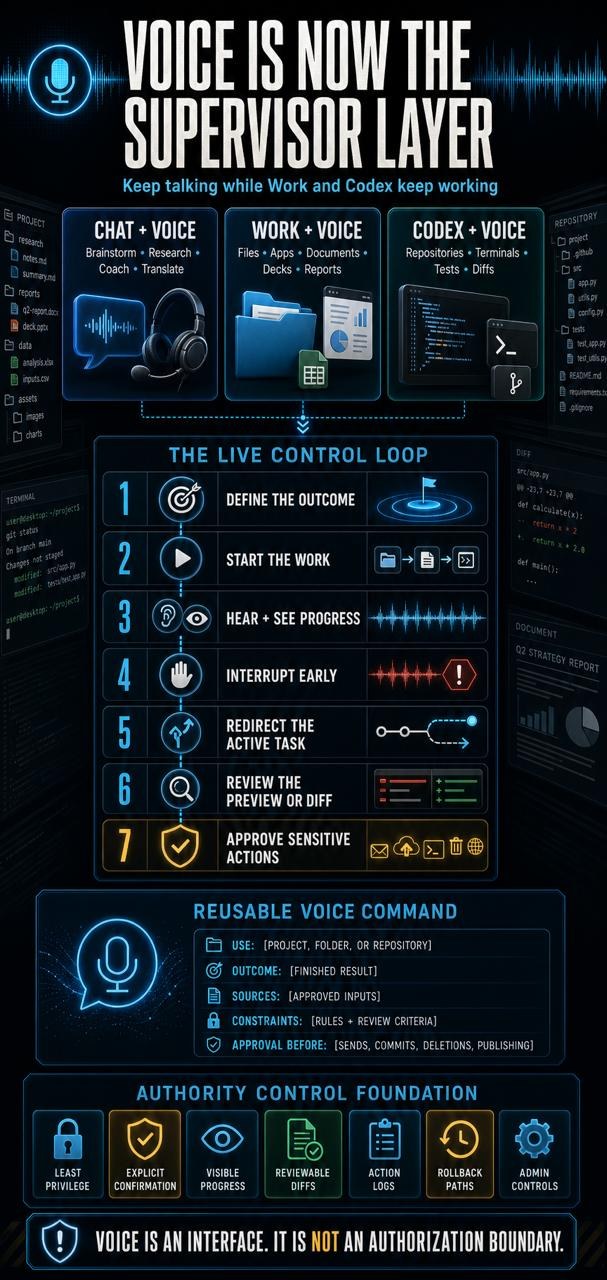
Enterprises should require the following controls. These are operating requirements organizations should impose; they are not guarantees that Voice enforces automatically:
- least-privilege access to folders, repositories, applications, and connected tools
- explicit confirmation before sends, publishes, purchases, commits, deletions, permission changes, or production actions
- visible progress and clear blocked-state reporting
- reviewable diffs and source-linked deliverables
- logs showing what the agent accessed and changed
- rollback paths for every material action
- workspace settings and administrator controls governing access to Work, Codex, Voice features, and connected tools
The operational question is not only, “Did ChatGPT understand me?”
It is, “What authority did ChatGPT have when it interpreted me?”
Choose the right mode
Use Chat with Voice for brainstorming, web research, role-play, coaching, translation, and everyday questions.
Use Work with Voice for multi-step research, approved local files, desktop applications, documents, decks, spreadsheets, reports, Sites, and longer projects.
Use Codex with Voice for repositories, debugging, tests, commands, code review, and implementation.
The Live option in ordinary Chat does not currently support video or screen sharing; eligible mobile subscribers can continue using those capabilities with Advanced Voice. Live also does not initially support connected apps or plugins. Voice in Work and Codex is different because it can coordinate the tools and permissions available inside those experiences.
A reusable voice command structure
Use this pattern:
“Use [project, folder, or repository]. The outcome is [finished result]. Base it on [sources]. Follow these constraints: [constraints]. Evaluate it using [review criteria]. Work autonomously except before [irreversible or sensitive actions]. Keep me informed through Voice and show me the finished result.”
Practical refinements:
- Ask Voice to speak faster or slower, but do not expect precise percentage controls.
- Ask it to say only “done” when a task finishes, then explain the result when requested.
- State architectural constraints before coding begins.
- Ask for progress only when a decision or blocker needs you.
- Require a diff, preview, or draft before any external action.
Your AI Pathfinder Action Plan
Before using Voice for consequential work:
- Start with a low-risk project folder or repository.
- Grant access only to the files and tools required for that task.
- Define the finished outcome, source hierarchy, constraints, and review criteria aloud.
- Name the actions that always require approval.
- Interrupt and redirect the agent as soon as an assumption looks wrong.
- Review the finished artifact, evidence, and change history before accepting it.
- Expand authority only after the workflow proves reliable.
Frequently Asked Questions
Can ChatGPT Voice now control any application on my computer?
No. It can coordinate the tools and permissions available to Work or Codex. Exact capabilities depend on your plan, workspace settings, application version, operating-system permissions, and selected experience.
Is this available on mobile?
Voice in Work and Codex runs in the macOS and Windows desktop app for eligible accounts. After pairing an iPhone with a supported desktop host, users can access supported remote sessions from iOS; standalone Work/Codex Voice remains unavailable on web or mobile. Availability depends on plan, rollout, region, app version, and workspace settings.
Can Voice see my screen?
The Live option in ordinary Chat does not currently support video or screen sharing; eligible mobile subscribers can continue using those capabilities with Advanced Voice. Work or Codex may use desktop computer context through separately granted operating-system permissions.
What are the limits?
Only one Voice conversation can run at a time, and a single Live conversation can last up to two hours. Plan limits and pricing vary. OpenAI currently lists unlimited GPT-Live-1 access for the $200/month Pro tier, while other plans and workspace tiers have different allowances. Unlimited Voice does not mean unlimited Work or Codex execution; delegated tasks continue to draw from the applicable shared agentic or Codex usage budget.
What happens to the audio?
OpenAI says Live and Advanced Voice audio clips are stored with the transcript and retained for 30 days. Deleting the chat deletes associated clips within 30 days, subject to OpenAI’s security, safety, and legal exceptions; clips previously shared for training and already disassociated from the account may continue to be retained or used. Audio and video clips require a separate sharing opt-in. Transcripts and uploaded files may be used when “Improve the model for everyone” is enabled, depending on plan and settings. Business, Enterprise, and Edu users cannot opt their Voice clips into training.
The Bottom Line
ChatGPT Voice now provides a live conversational layer over agentic work in Work and Codex. That lowers coordination friction, but makes permission design, approval gates, and review discipline more important.
The advantage will go to operators who define outcomes clearly, grant authority carefully, and intervene early.
If your organization is evaluating voice-directed agents for private data, software development, or operational workflows, Netsync can help design the permissions, controls, and bounded pilot before those agents receive broader authority.
Sources and further reading
About Jason Fleagle
Jason J. Fleagle helps business and public-sector leaders turn AI uncertainty into practical strategy, governance, architecture, and measurable operating outcomes. He is the Head of AI at Netsync Network Solutions and writes AI Pathfinder for leaders trying to adopt AI without losing control of risk, cost, or execution.
More from Jason at thejasonfleagle.com and in AI Pathfinder.
Related AI Pathfinder reading
- Human-in-the-Loop AI Governance
- AI Agent Use Case Library
- AI Governance Checklist
- Enterprise AI Roadmap Template
Originally published on LinkedIn.
About AI Pathfinder
AI Pathfinder is Jason Fleagle’s recurring field note on enterprise AI, agentic systems, AI governance, and the operating models leaders need as AI moves from experiments into real work.