
The world of AI-powered development is moving at a breakneck pace, and Claude Code is at the forefront of this revolution. But to truly harness its power, you need to move beyond basic prompting and embrace the principles of agentic engineering. In this tutorial I wanted to break down the core concepts of Claude Code, from its powerful Plan Mode to the game-changing introduction of self-validating agents.
We’ll explore how to build robust, reliable AI systems that you can trust, and we’ll debunk some of the common myths and misconceptions that are holding developers back.
The Core Philosophy: Don’t Delegate Learning
Before we dive into the technical details, it’s crucial to understand the most important principle of working with Claude Code: do not delegate the learning process to your agents.
“The worst thing any engineer can do is start the self-deprecation process by not learning anything new.”
It’s tempting to let these powerful models do all the work, but if you’re not actively learning and internalizing the knowledge, you’ll be stuck. The goal is not to replace your skills, but to augment them. Use Claude Code to accelerate your workflow, but always take the time to read the docs, understand the underlying technologies, and stay on top of the latest releases.
Think of Claude Code as a force multiplier, not a replacement. When you actively engage with the code it generates, you’ll learn new patterns, discover better approaches, and internalize best practices that will make you a better engineer. The developers who thrive in the age of AI are the ones who use these tools to accelerate their learning, not to avoid it.
Claude Code Plan Mode: Your Agentic Blueprint
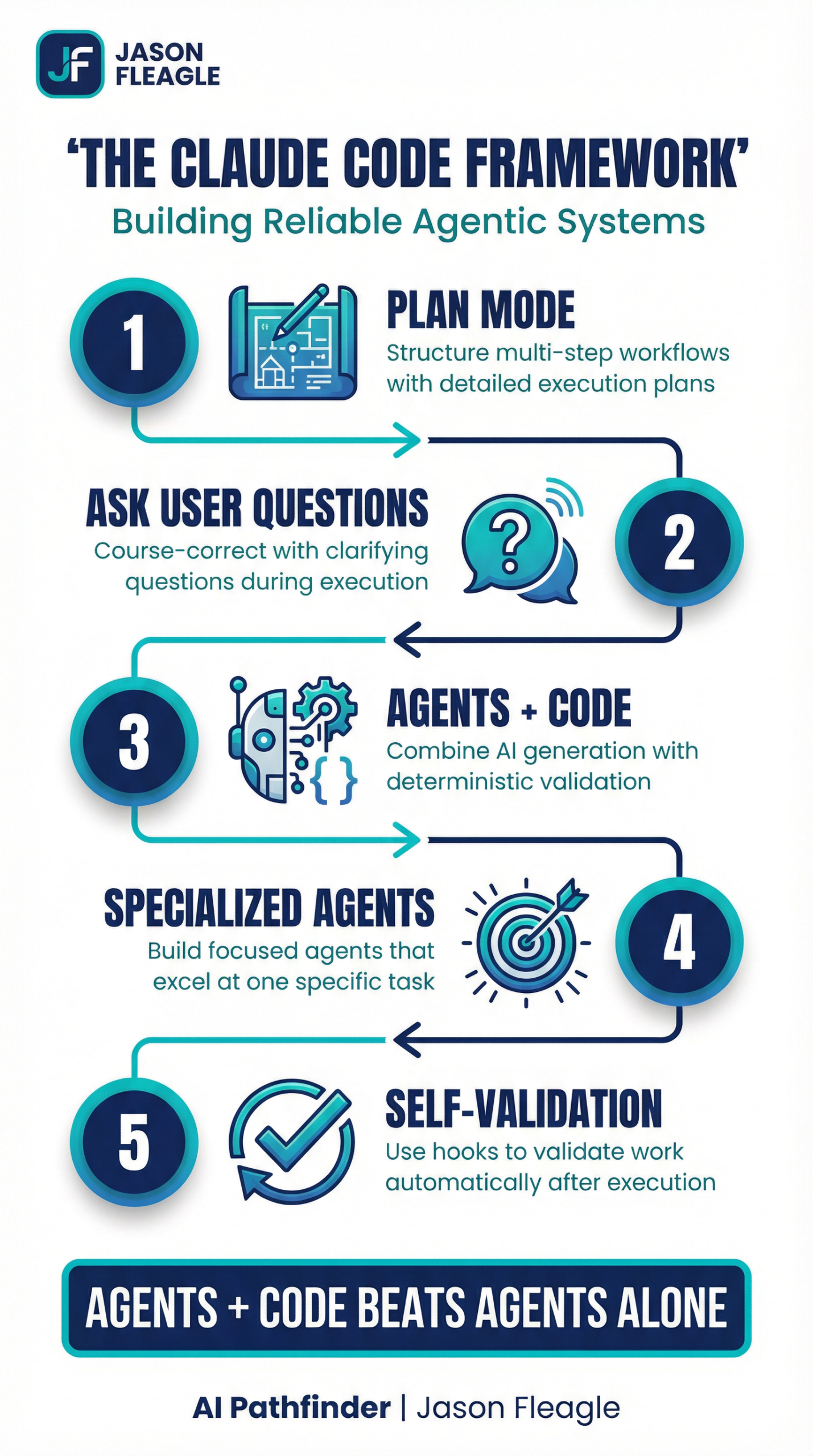
Plan Mode is the heart of Claude Code’s agentic capabilities. It’s where you move from a simple conversational back-and-forth to a structured, multi-step workflow. When you activate Plan Mode, Claude Code will analyze your request and generate a detailed plan of action, breaking down the task into a series of discrete steps. This plan becomes your agentic blueprint, and it’s the key to building complex, reliable AI systems.
The power of Plan Mode lies in its ability to break down complex tasks into manageable chunks. Instead of trying to solve everything at once, Claude Code will create a structured approach that tackles each piece systematically. This not only makes the agent more reliable, but it also makes it easier for you to understand what’s happening at each stage and intervene if necessary.
When you’re working with Plan Mode, pay close attention to the plan that Claude generates. Is it logical? Are there any steps that seem unnecessary or out of order? This is your opportunity to refine the approach before any code is written. A good plan is the foundation of a successful agentic workflow.
The “Ask User Question” Tool: Your Course-Correction Mechanism
One of the most powerful tools in your agentic arsenal is the ask_user_question tool. This allows your agent to pause its execution and ask for clarification or guidance. This is not a sign of failure; it’s a feature of a well-designed system. It’s your opportunity to course-correct, provide additional context, and ensure that the agent is on the right track.
Think of this as a collaborative conversation rather than a one-way delegation. When your agent asks a question, it’s demonstrating intelligence by recognizing its own uncertainty. This is far better than having an agent that confidently proceeds down the wrong path. Embrace these moments of clarification as opportunities to steer the project in the right direction.
The Ralph Wiggum Technique: Agents + Code = Trust
The so-called “Ralph Wiggum” technique is a powerful illustration of a core principle of agentic engineering: agents + code beats agents alone. The idea is to combine the generative power of AI with the deterministic reliability of code. This is where self-validation comes in.
By building custom validators and linters, you can create a closed-loop system where your agent not only generates code but also validates its own work. This is the key to building trust in your AI systems. You’re not just hoping the agent gets it right; you’re giving it the tools to prove that it did.
The name “Ralph Wiggum” comes from the Simpsons character who is lovable but not always reliable. The technique acknowledges that AI agents, like Ralph, can be incredibly helpful but need guardrails to ensure they don’t go off track. By combining the agent’s creativity with deterministic code validation, you get the best of both worlds: flexibility and reliability.
Ras’s Ralph Setup: A Practical Example
A great example of this in practice is Ras’s Ralph setup, which combines:
- Progress Tracking: To monitor the agent’s progress through the plan.
- Tests: To validate the functionality of the generated code.
- Linting: To ensure code quality and consistency.
This creates a robust development loop where the agent’s work is constantly being checked and validated, giving you a high degree of confidence in the final output.
Ras’s setup demonstrates how to build a production-ready agentic system. The progress tracking ensures you always know where the agent is in its workflow. The tests provide functional validation, ensuring that the code actually does what it’s supposed to do. And the linting ensures that the code meets your team’s quality standards. Together, these three elements create a system that you can trust to deliver reliable results.
Specialized Self-Validating Agents: The Future of Agentic Engineering
The latest release of Claude Code takes this concept to the next level with the introduction of hooks. You can now run custom scripts at different stages of the agent’s lifecycle:
pre-tool-use: Before a tool is used.post-tool-use: After a tool is used.stop: When the agent finishes its work.
This allows you to build specialized self-validating agents that are hyper-focused on a specific task. For example, you could create a CSVEdit agent that automatically runs a CSV validator after every read, write, or edit operation. This is a game-changer for building reliable, scalable AI systems.
The introduction of hooks represents a fundamental shift in how we think about AI agents. Instead of treating them as black boxes that we hope will work correctly, we can now build in validation at every step of the process. This transforms AI agents from unpredictable assistants into reliable, trustworthy tools that can be deployed in production environments.
A Deep Dive into Self-Validation with Hooks
Let’s walk through a practical example of how to build a self-validating agent. We’ll create a CSVEdit agent that can read, edit, and report on CSV files. The key here is that after every file operation, our agent will automatically run a validator to ensure the CSV is still in a valid format.
1. Creating the Custom Command
First, we create a new custom command in Claude Code. This is a markdown file that defines the agent’s purpose, tools, and, most importantly, its hooks.
---
name: csv-edit
description: Make modifications and report on CSV files.
args:
  - name: file
    description: The CSV file to operate on.
  - name: request
    description: The user's request.
tools:
  - search
  - read
  - write
  - edit
hooks:
  post-tool-use:
    - command: uv run .claude/hooks/validators/csv_single_validator.py
      tools: [read, write, edit]
---

## Purpose

Make modifications or report on CSV files.

## Workflow

1.  Read the CSV file provided in the `file` argument.
2.  Make the modification or report based on the `request` argument.
3.  Report the results to the user.
In the front matter of this command, we’ve defined a post-tool-use hook. This tells Claude Code to run our validator script (csv_single_validator.py) every time the read, write, or edit tool is used.
2. Building the Validator
Next, we create our validator script. This is a simple Python script that uses the pandas library to try and read the CSV file. If it fails, it means the CSV is malformed, and it will report an error back to the agent.
# .claude/hooks/validators/csv_single_validator.py
import pandas as pd
import sys

file_path = sys.argv[1]

try:
    pd.read_csv(file_path)
    print("CSV validation passed.")
except Exception as e:
    print(f"CSV validation failed: {e}")
    print(f"Please resolve this CSV error in {file_path}")
This validator is intentionally simple, but you can make it as sophisticated as you need. You could check for specific column names, validate data types, ensure that certain fields are not null, or verify that the data meets business rules. The key is that this validation happens automatically after every file operation, creating a safety net that catches errors before they propagate.
3. The Closed Loop in Action
Now, when we run our csv-edit command, here’s what happens:
- The agent reads the CSV file.
- The
post-tool-usehook is triggered, and our validator script is run. - If the CSV is valid, the validator passes, and the agent continues.
- If the CSV is invalid, the validator fails and prints an error message.
- This error message is fed back into the agent’s context.
- The agent, now aware of the error, will attempt to fix the CSV file.
This creates a closed-loop system where the agent is constantly validating its own work and correcting its own mistakes. This is the essence of building trustworthy AI systems.
The beauty of this approach is that it’s self-correcting. The agent doesn’t just fail when it encounters an error; it receives feedback about what went wrong and has the opportunity to fix it. This is similar to how a human developer would work: write some code, run the tests, see what failed, fix the issues, and repeat until everything passes.
What are “Ralph loops” and why plans and documentation matter most
The iterative process of an agent validating and correcting its own work is what we call a “Ralph loop.” It’s a continuous cycle of action, validation, and correction that allows the agent to autonomously converge on a correct solution. This is a fundamental shift from the traditional model of AI development, where the human is responsible for validating and correcting the AI’s output.
In an AI agentic system, the human’s role shifts from being a validator to being a planner and a documenter. Your primary job is to:
- Create clear, detailed plans: The better your plan, the more likely your agent is to succeed. A good plan is like a good set of instructions for a human; it leaves no room for ambiguity and provides a clear path to the desired outcome.
- Write comprehensive documentation: Your documentation is not just for other humans; it’s for your agents as well. The more context you can provide your agents, the better they will be able to understand your intent and make the right decisions.
The shift from validator to planner is a significant one. Instead of spending your time checking the agent’s work, you spend your time setting it up for success. This means investing time upfront in creating detailed plans and comprehensive documentation. The payoff is that your agents will be more autonomous, more reliable, and more capable of handling complex tasks without constant supervision.
Claude Code Best Practices: Getting the Most Out of Your Agents
As you build more sophisticated agentic systems with Claude Code, here are some best practices to keep in mind:
Start Simple, Then Scale: When you’re building a new agent, start with the simplest possible version. Get that working reliably, then add complexity incrementally. This makes it easier to debug issues and understand what’s working and what’s not.
Test Your Validators: Your validators are just as important as your agents. Make sure they’re catching the errors they’re supposed to catch, and that they’re not producing false positives. A validator that’s too strict will slow down your agent; one that’s too lenient will let errors slip through.
Document Your Workflows: When you create a custom command, document not just what it does, but why it does it that way. This will help you (and your team) understand the reasoning behind your design decisions when you come back to it later.
Monitor Your Agents: Even with self-validation, it’s important to monitor your agents’ performance. Look for patterns in the errors they encounter, and use that information to improve your plans, documentation, and validators.
Iterate on Your Plans: Your first plan is rarely your best plan. As you learn more about how your agents work, refine your plans to make them more effective. This is an iterative process, and each iteration will make your agents more capable.
Tips & Tricks for Effective Agentic Engineering
Don’t obsess over MCP/skills/plugins: These are just abstractions. At the end of the day, it all boils down to the core four: context, model, prompt, and tools. Master these fundamentals, and you’ll be able to build powerful agents regardless of the latest abstractions.
Start with reps, not automation: When you’re learning a new pattern or tool, do it by hand first. Don’t immediately jump to automating everything. Take the time to understand the process, and you’ll build better, more reliable automations in the long run.
Focus on specialized agents: Don’t try to build a single, monolithic “super agent” that does everything. Instead, build a team of specialized agents that are each great at one thing. This is the key to building scalable, high-performing AI systems.
The advice to “start with reps, not automation” is particularly important. It’s tempting to immediately try to automate every task with an AI agent, but this often leads to brittle systems that break in unexpected ways. Instead, do the task manually a few times first. Understand the edge cases, the common pitfalls, and the nuances of the workflow. Then, when you build your agent, you’ll be able to anticipate these issues and build in the appropriate safeguards.
Scroll-Stopping Software Wins
At the end of the day, the goal is to build software that is so good, it stops people in their tracks. This is what we call “scroll-stopping software.” It’s not about hype or flashy demos; it’s about building real, valuable tools that solve real-world problems.
By embracing the principles of agentic engineering and building specialized, self-validating agents, you can create software that is not only powerful but also reliable and trustworthy. That’s the future of AI-powered development, and it’s a future that’s being built today with Claude Code.
Scroll-stopping software is software that delivers so much value, so reliably, that users can’t help but talk about it. It’s software that solves a real problem in a way that feels almost magical. And with Claude Code and the principles of agentic engineering, this kind of software is within reach for every developer who’s willing to put in the work to build it right.
Take the Next Step
Understanding these principles is the first step. Putting them into action is what will set you apart.
AI Consulting for Your Business: If you’re ready to move beyond the hype and start implementing a real AI strategy, my team and I can help. We work with organizations to navigate the complexities of AI adoption, from process optimization to building custom AI agents. Let’s discuss your AI goals by scheduling a consulting call together.
If you’re interested in a custom AI workshop for your business or in your city, please reach out to me directly to start a conversation.
About Jason
Jason Fleagle is a Chief AI Officer and Growth Consultant working with global brands to help with their successful AI adoption and management. He is also a writer, entrepreneur, and consultant specializing in tech, marketing, and growth. He helps humanize data—so every growth decision an organization makes is rooted in clarity and confidence. Jason has helped lead the development and delivery of over 500 AI projects & tools, and frequently conducts training workshops to help companies understand and adopt AI. With a strong background in digital marketing, content strategy, and technology, he combines technical expertise with business acumen to create scalable solutions. He is also a content creator, producing videos, workshops, and thought leadership on AI, entrepreneurship, and growth. He continues to explore ways to leverage AI for good and improve human-to-human connections while balancing family, business, and creative pursuits.
You can learn more about Jason on his website here.
You can learn more about our top AI case studies here on our website.
Learn more about my AI resources here on my youtube channel.
And check out my AI online course.